Text To Handwriting Review: A True Lifesaver for Me
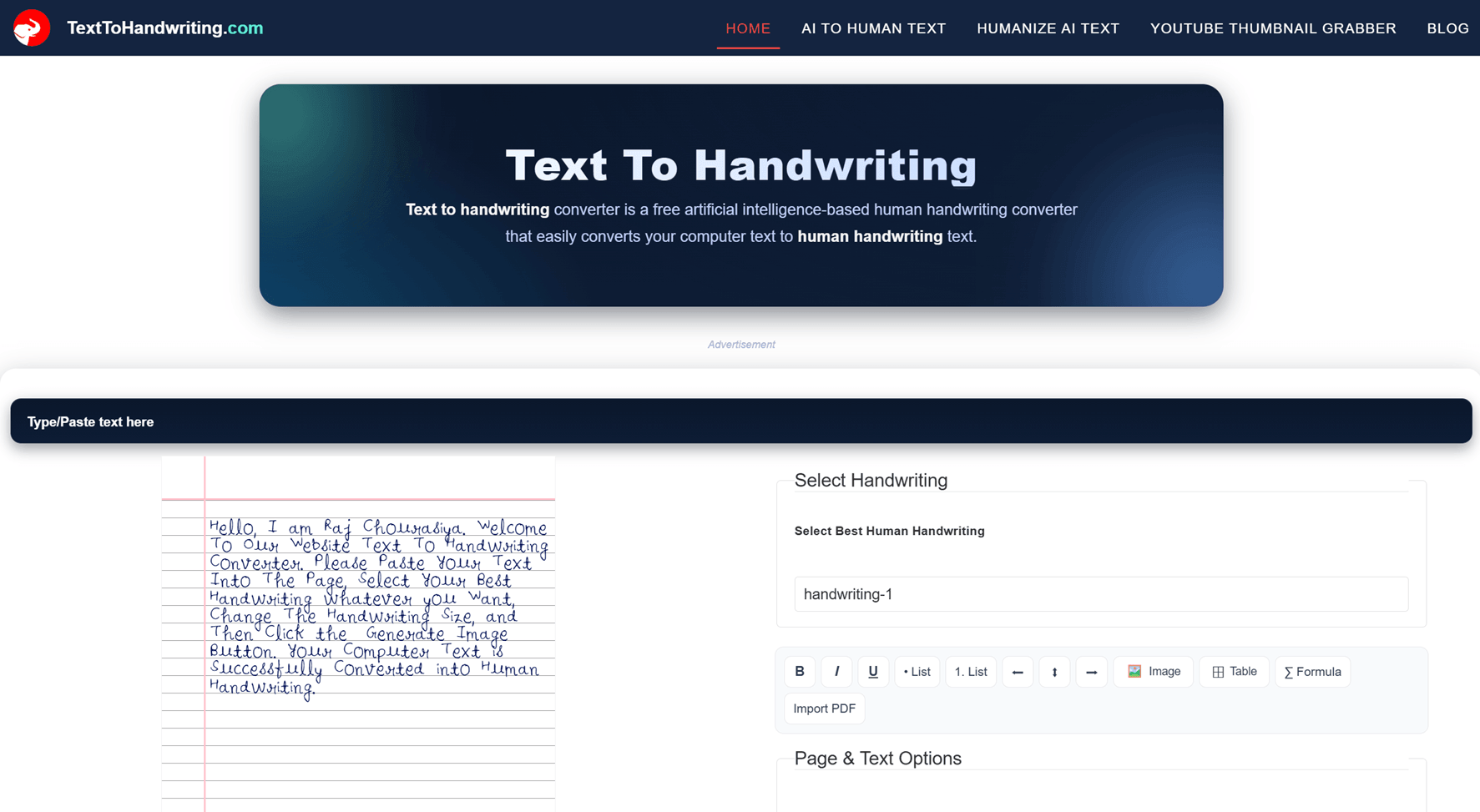
There are some websites that simply save time, and then there are websites that feel like a gift when you are under pressure. Text To Handwriting belongs to the second category.
As someone who regularly creates assignments, notes, and handwritten documents, I can honestly say this tool has been incredibly useful. It turns plain typed text into realistic handwritten pages in just a few seconds. What would normally take hours to write by hand can be completed almost instantly.
What Is TextToHandwriting.com?
TextToHandwriting.com is an online tool that converts digital text into pages that look handwritten. You paste your content, customize the appearance, and download the result as an image or printable document.
This tool is especially helpful for:
- Students preparing homework and assignments
- Teachers creating sample notes
- Professionals making handwritten-style letters
- Content creators designing handwritten visuals
- Anyone who wants realistic handwriting without writing manually
My Personal Experience
I found this website when I had a large assignment to submit and very little time left. Writing everything by hand would have taken several hours.
I pasted my text into the tool, selected a handwriting style, adjusted the ink color and spacing, and downloaded the pages. The output looked surprisingly natural.
The biggest advantage was the time saved. Instead of spending half a day writing, I finished the work in minutes.
That is why I describe this website as a real blessing.
Features That Make This Tool Stand Out
1. Realistic Handwriting Output
The generated pages look close to natural handwriting. The letters are well-shaped and appear as if they were written on actual notebook paper.
2. Multiple Handwriting Fonts
You can choose from different handwriting styles to match the appearance you want.
3. Paper Background Options
The tool supports lined pages and other notebook-style backgrounds, making the final result look like a real assignment.
4. Ink Color Selection
Choose blue, black, or other colors to make the writing look more authentic.
5. Spacing and Margin Controls
Customize line spacing, word spacing, and page margins for better realism.
6. Instant Preview
Changes appear quickly, allowing you to fine-tune the document before downloading.
7. Downloadable Output
You can save your work and print it for school, office, or personal use.
Why Students Love This Website
Students often need to submit handwritten work, but large assignments can take many hours to complete.
TextToHandwriting.com solves this problem by converting typed content into handwritten pages within seconds.
Major Benefits for Students
- Saves significant time
- Reduces hand fatigue
- Produces neat and readable work
- Helps with urgent deadlines
- Easy to use without technical knowledge
How to Use TextToHandwriting.com
- Open the website.
- Paste or type your text.
- Select a handwriting font.
- Choose paper and ink styles.
- Adjust spacing and margins.
- Preview the output.
- Download and print the pages.
Quality of the Output
The output quality is excellent for most common use cases.
The pages look clean, readable, and convincing. After printing, they resemble handwritten notes closely enough for school projects, sample documents, and presentations.
Best Use Cases
- School and college assignments
- Project reports
- Personal letters
- Classroom handouts
- Study notes
- Creative designs
- Social media graphics
Pros and Cons
Pros
- Free and easy to use
- Fast conversion
- Realistic handwriting styles
- Customizable appearance
- High-quality downloadable pages
- No advanced skills required
Cons
- Some users may want even more font options
- Large documents can require additional formatting adjustments
Comparison with Manual Writing
| Feature | Manual Writing | TextToHandwriting.com |
|---|---|---|
| Time Required | Hours | Minutes |
| Physical Effort | High | Minimal |
| Consistency | Varies | Very Consistent |
| Editing | Difficult | Easy |
| Overall Convenience | Moderate | Excellent |
Who Should Use It?
- Students
- Teachers
- Bloggers
- Designers
- Professionals
- Anyone needing handwritten-style pages quickly
Is It Safe to Use?
The website is designed as a simple text-to-handwriting converter. As with any online tool, avoid uploading highly sensitive personal information unless you have reviewed the site's privacy policy.
My Honest Rating
| Category | Rating |
|---|---|
| Ease of Use | 10/10 |
| Output Quality | 9.5/10 |
| Speed | 10/10 |
| Customization | 9/10 |
| Overall Experience | 9.8/10 |
Final Verdict
TextToHandwriting.com is one of the most useful online tools I have used for creating handwritten documents.
It is fast, simple, and highly practical. For students facing assignment deadlines, it can save hours of repetitive writing. For teachers and professionals, it provides a quick way to create handwritten-style content.
If you need realistic handwritten pages without writing everything by hand, this website is definitely worth trying.
Overall Rating: 9.8/10
If you are a student, this tool can feel like a genuine time-saving gift.